DMR2YSF
Yaesu System Fusion (YSF), and particularly Wires-X, is proprietary to Yaesu radios however DMR2YSF allows access to the open parts of YSF via your DMR radio.
Configuration
To begin, in the MMDVMHost Modem Configuration section, make sure you have DMR enabled, then toggle DMR2YSF mode on:
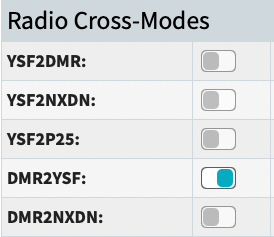
Apply Changes to save the configuration. After the hotspot re-starts and the page returns, scroll to Yaesu System Fusion Configuration.
Set a YSF Startup Host. This sets a YSF or FCS reflector that will be connected to when the system starts. This example sets it to “FCS00290 - America-Link-WiresX”, but you may choose any other. It might be a good idea to set this to “None” and then use the YSF Manager (as detailed below) to connect when desired.
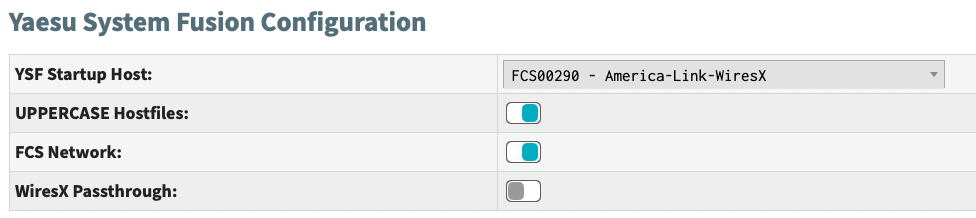
Leave UPPERCASE Hostfiles and FCS Network toggled on. You need not make any other changes in this section. Apply Changes to save the configuration.
If you have followed the instructions correctly, on your Dashboard in Mode Status, you should see DMR X-Mode green; in Network Status, you should see DMR2YSF Net green. Below that, in YSF Status, you should see that you are in a room (such as America-Link-WiresX).
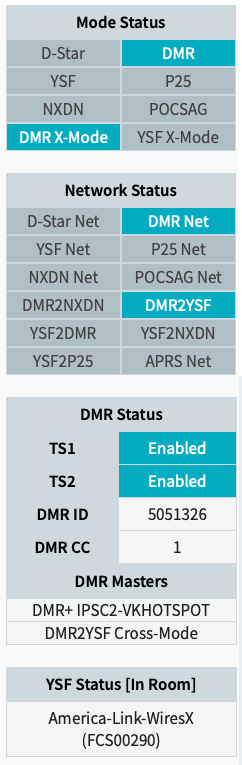
You have completed configuring your hotspot for DMR2YSF mode.
Unlinking or changing reflectors via the web dashboard
Once you have DMR2YSF configured you can manage which reflector you are connected to via the YSF Manager. To find the YSF Manager click on Admin on the top right of the Dashboard then clock on YSF Manager from the boxes below.

Unlinking or changing reflectors via your DMR radio
Linking and unlinking reflectors from your DMR radio is supported however the system gives you no audio feedback so it can be a bit confusing to use.
To start, make sure you are not linked to a default reflector via the dashboard. Select None as the reflector in the YSF Configuration section of the Configuration page.
To unlink a reflector send a kerchunk to TG 7000000. This may take a couple of tries. There is no audio feedback, so the only indication that you have successfully unlinked will be via the web dashboard.
To link to a YSF reflector send a kerchunk to TG 70xxxxx where xxxxx is the zero padded reflector number. For example, to connect to GB-CQ-WORLD use TG 7000013. There is no audio feedback, so the only indication that you have successfully linked will be via the web dashboard.
Important
While YSF reflectors have a consistant numbering scheme and map into DMR talkgroups cleanly, FCS reflectors are different and don’t map cleanly making them difficult to reliably access.
Linking to a FCS reflector is possible but the exact talkgroup to use is arbitrary and may change every time the FCS reflector list is changed. If you want to connect to an FCS reflector, it’s almost certainly best to use the web dashboard.
Talking via the connected reflector
To talk to a YSF reflector, use TG 70xxxxx where xxxxx is the zero padded reflector number. For example, to talk on YSF00013, GB-CQ-WORLD use TG 7000013.
For FCS reflectors the easiest option is to watch on the web dashboard for someone already talking on the reflector and see what talkgroup they appear on, then set your radio to use that talkgroup. For example, at the time of writing FCS00290, America-Link-WiresX comes though on TG 7000290.
Important
If you have a duplex hotspot, all of the above talkgroups use timeslot 2.